Thursday, July 6, 2017

Generate pdf documents for iOS, Android & Windows UWP using Xamarin Forms and Syncfusion Essentials–Part 2

Part 1 of the post can be found here
There I talk about getting started, and generating a simple pdf invoice.

The updated source code is in the same repository here
Code of interest is in the GenerateInvoiceCommand, the PdfGenerator & PdfExtensions

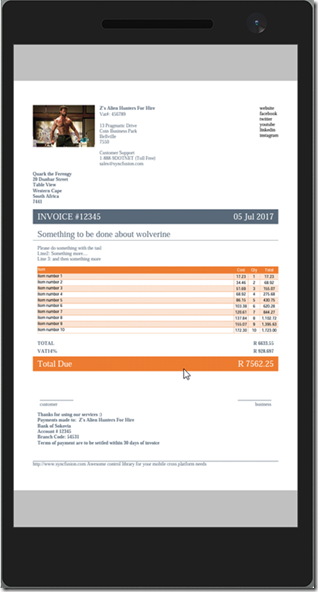
Today, I’m going to be talking about generating line items for the invoice. Here’s a screenshot of the generated result on all three platforms:
image
    
With Syncfusion Essentials Pdf, there are two main options for this: PdfLightTable & PdfGrid

After having implemented both, I don’t really see why both exist – the effort and functionality is about the same for both options.
I can say though, that PdfGrid definitely seems the more stable of the two – I found a few bugs in PdfLightTable along the way.

A look at the result: PdfLightTable on the left, and PdfGrid on the right

imageimage

Some things to consider (included in the sample code above)

More documentation on pdf grid and light table can be found here

Adding data

Both types used direct data-source methodologies.

Grid:
image

LightTable:
image

Sizing columns to content

Unfortunately this isn’t as simple as it should be. Static widths are easy – content not so much.
I created extensions for both LightTable and PdfGrid here (currently LightTable doesn’t appear to work)
Currently we have to cycle through all the column data, and measure which is the longest text, and then set the width to the max content width, hence the need for data, page width and font used.

image

Styling the table

PdfGrid has some built-in styles, as well as customization
image

LightTable you can customize the same as with PdfGrid – I created an extension to apply the most common properties to mimic the built-in style of the PdfGrid
image

Paginating the data

This applies to both table types, although again, LightTable seems to have some trouble honoring the PageinateBounds property – which is needed to the table doesn’t render over any footer data.
image

Drawing the pdf document

image

simple enough.

There’s tons more functionality in syncfusion’s pdf library – go check it out.

Clone the repo and play around with the code - and log an issue if you find any bugs in there :)

And don’t forget syncfusion’s awesome community license that  offers their controls free for indie hackers and small businesses.

Tuesday, May 16, 2017

Xamarin Forms: GridView Control

So I was busy with my nightly dev sessions, building the next big startup product [read side-project], when I ran into what I thought was a fairly simple requirement:
I wanted to show a list of stuff in a template of an item that was in a ListView.
image
Turns out hosting a ListView inside a ListView doesn’t work out so well. Besides it being a rocket ship when I only needed a small car, it just doesn’t work. You see, the ListView has some sizing issues that doesn’t make it a great candidate for said scenario.
Now unless I’m missing something here (which is quite likely), I couldn’t really find any Xamarin Forms control that hosted a simple list of items, without needing properties like grouping, selecteditem etc.
After some searching on the interwebs, I came across this really simple example of what I needed from Chase Florell. (I’ve since happened upon this contribution by Daniel Luberda, which also looks pretty decent). It met my very basic requirement of a simple list of stuff, minus some handy bindings, so I set out to edit the code.
You can see the results (source code and sample project) here
Basically, you can create a tile-like layout with N many columns. The content of the “tiile” can be any template you like.
Sample Xaml:
image
The control also supports ItemTappedCommand, which will call a delegate and pass the selected data item as a parameter.
The default for MaxColumns is 1 – which will give you a simple list as illustrated at the top of the post. More columns will give you something like:
imageimage
I wouldn’t use this implementation for more than about 20 or so data items, as there is no cell recycling as you would get in a ListView, but for very basic scnenarios, I’ve found this simple implementation good enough.
As a side note, I’ve also moved the previously mentioned Bindable IsVisible ToolbarItem control to the linked repo, in addition to a few other very basic controls like an Editor that expands as you type, a ListView with ItemClickCommand and default RecycleElement mode, a floating label pattern Entry (pending), and a simple WrapLayout (which I’ve used in combination with an AddStringEntry to create a Tag List)  - which I’ll cover in subsequent posts as I find the time.
Note: FlexLayout & RelativeLayout are new controls coming in Xamarin Forms 3.
Xamarin FTW Smile